
How to Build a Gaming Setup in a Small NYC Apartment
How to build a gaming setup in a small NYC apartment: space-saving desks, quiet cooling, cable management, and layouts that work in studios under 500 square feet.
Written by admin
Published October 31, 2026
Reading time 7 minutes
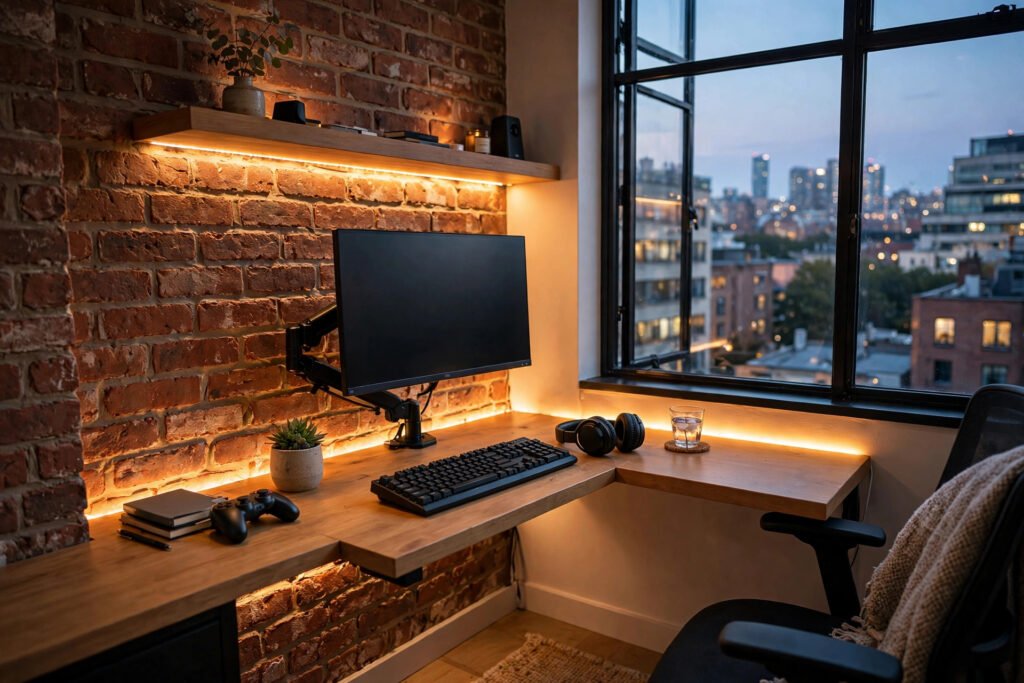
New York City apartments are famously small — the median Manhattan studio hovers around 500 square feet, and plenty of gamers are working with far less. But a cramped apartment does not mean a cramped gaming experience. With smart furniture choices, clever cable management, and a layout designed around your actual space, you can build a gaming setup in a small NYC apartment that rivals battlestations three times its footprint.
This guide is written for real New York living: thin walls, strict landlords, radiators under windows, and bedrooms that double as offices. Here is how to make it work.
Start With the Layout, Not the Gear
The biggest mistake small-space gamers make is buying equipment before planning the room. Measure your wall space first — every inch matters. In a studio, the ideal gaming zone is a single wall or corner that serves as your dedicated station, keeping the rest of the room feeling like a home rather than an arcade.
Corner placement is your best friend. An L-shaped or corner desk tucks into dead space and gives you more surface area per square foot than any straight desk. If even that is too much, a wall-mounted fold-down desk (around $100–150) gives you a full workstation that disappears when guests come over — just check NYC’s tenant resources on nyc.gov regarding wall-mounting rules in rentals before drilling. Pair it with a comfortable chair that fits under the desk completely — every inch of clearance counts.
Think vertically. Monitor arms that clamp to the desk free up the entire surface underneath. Floating shelves above the desk hold consoles, controllers, and headsets without consuming floor space. In NYC apartments where floor space is the scarcest resource, going up is the single highest-impact change you can make — the same principle behind making a small apartment feel bigger in general.
The Space-Saving Desk and Chair
For desks, look for 40–47 inch models with a depth of at least 20 inches — enough for a monitor on an arm, keyboard, and mouse without crowding. Avoid bulky “gaming desks” with giant legs and racing stripes; a simple, sturdy desk with clean lines visually disappears into a small room. If you are on a tight budget, a solid IKEA-style tabletop on adjustable legs works brilliantly and costs a fraction of branded gaming furniture.
Chairs are where small-space gamers should not compromise — you will spend hours in it, and back pain is not worth the savings. But skip the oversized racing thrones. A quality ergonomic office chair with a compact footprint (no giant wings, no wide base) fits under the desk and supports long sessions. Mesh backs also help in NYC summers when the AC is fighting a gaming PC’s heat output.
Taming Heat and Noise in a Small Room
A gaming PC in a 400-square-foot studio is effectively a space heater. In winter this is almost pleasant; in a New York August, it is miserable. A few strategies help enormously:
Position for airflow. Keep the PC off carpet and away from walls — at least a few inches of clearance on intake and exhaust sides. Under-desk placement works if the case has front intake; otherwise, a small side table beside the desk is better.
Undervolt and tune fan curves. Modern GPUs can often run 10–15°C cooler with a modest undervolt and zero performance loss. It takes 20 minutes to set up and transforms both heat and noise. Your neighbors through thin walls will thank you.
Consider noise at night. NYC leases do not ban gaming PCs, but running a business from your apartment legally — including streaming — comes with noise considerations. Closed-back headphones, a quiet mechanical keyboard (or membrane for late nights), and reasonable hours keep you on good terms with neighbors.
Cable Management: The Small-Room Multiplier
In a large room, messy cables are an eyesore. In a small NYC apartment, they make the whole space feel chaotic. Cable management is not vanity here — it is square footage psychology.
The essentials: a cable management tray under the desk, velcro ties (never zip ties — you will reconfigure), and a single power strip mounted under the desk so only one cable runs to the wall. Route monitor and peripheral cables along the monitor arm. For consoles, a small shelf with the cables tucked behind eliminates the rat’s nest entirely. The whole project costs under $30 and takes an afternoon, and the visual difference is dramatic.
Internet: The Invisible Bottleneck
Many NYC buildings have excellent wired infrastructure — and many have terrible WiFi environments, with dozens of neighboring networks competing on the same channels. For gaming, this matters more than almost any hardware upgrade.
If your desk is near the router, use ethernet. A flat ethernet cable can run along baseboards nearly invisibly, and the difference in latency stability versus WiFi is night and day. If you must use WiFi, a modern WiFi 6 router on a clear channel, positioned centrally and elevated, makes a huge difference — see our guide to improving your home WiFi signal in every room. And check what speed you are actually getting: the FCC’s broadband resources can help you verify whether your plan delivers what you pay for.
Lighting and Atmosphere on a Budget
You do not need a wall of RGB to make a small setup feel premium. In fact, in a tiny room, restraint looks better. A single LED strip behind the monitor (bias lighting) reduces eye strain. One warm-toned lamp for the room keeps the space livable when you are not gaming. If you want accent color, a single smart bulb beats five competing RGB sources in a 300-square-foot room.
Acoustic panels deserve a mention too — not just for streamers. A few tasteful fabric panels on the wall behind your desk cut echo dramatically in boxy NYC rooms with hardwood floors, improving both voice chat and general comfort. They double as decoration.
The Console Gamer’s Small-Space Playbook
Not everyone games on PC. For console players in small apartments, the TV is the battleground. A 43–55 inch TV on a slim stand (or wall-mounted, with landlord permission) is the sweet spot — bigger screens force you to sit farther back than a small room allows. Keep consoles vertical on a narrow media shelf, use a single universal remote to reduce clutter, and consider a gaming monitor instead of a TV if you sit close: 27–32 inches at desk distance is immersive without dominating the room.
Budget: What a Great Small Setup Actually Costs
You do not need $3,000. A genuinely excellent small-space setup in 2026 looks like: a solid desk ($100–150), monitor arm ($35), ergonomic chair ($200–300), cable management ($30), bias lighting ($20), and whatever PC or console you already own. Under $500 in furniture and accessories transforms the experience more than a GPU upgrade for most casual players.
Spend where it touches your body daily — chair, keyboard, mouse, headset — and save on aesthetics. In a small NYC apartment, the best gaming setup is the one that disappears into your life when you are not playing.
Conclusion
Building a gaming setup in a small NYC apartment is an exercise in priorities: layout before gear, vertical space before floor space, and comfort before aesthetics. Measure first, buy second. Tame your cables, cool your PC, wire your connection, and choose furniture that serves double duty. New Yorkers have been making tiny spaces work for a century — your battlestation is just the latest chapter. A well-planned corner setup in a studio can feel better than a sprawling desk in a house, because every piece earned its place.
Frequently Asked Questions
Will my landlord care about a gaming setup?
Generally no — furniture and electronics are normal apartment use. Issues only arise with wall-mounting TVs (check your lease), excessive noise late at night, or running a commercial streaming operation, which can trigger home-business rules.
How do I keep a gaming PC cool in a small hot apartment?
Ensure case airflow with clearance on all sides, undervolt your GPU, clean dust filters monthly, and consider gaming with the PC near a window or AC airflow path. Laptop users should use a cooling stand.
Is WiFi good enough for gaming in an NYC apartment building?
It can be, but dense buildings create interference. Use the 5GHz band, pick a clear channel, keep the router elevated and central — or better, run a flat ethernet cable to your desk for rock-solid latency.
What is the best desk size for a small bedroom setup?
A 40–47 inch wide desk with 20+ inch depth fits a monitor on an arm plus keyboard and mouse comfortably. Corner or L-shaped desks give the most usable surface per square foot.
How can I game late without bothering neighbors?
Closed-back headphones, a quiet keyboard (linear switches with o-rings, or membrane), a rug under your chair, and keeping voice chat volume reasonable. NYC quiet hours run 10pm–7am — be extra considerate then.