
Every YouTuber seems to be selling one, but what is a VPN and do I really need one at home? Let's separate the marketing from the reality.
So, what is a VPN and do I really need one at home? I spent a good chunk of time researching this, comparing options, and reading what real users say. Here's the honest breakdown.
The Honest Answer
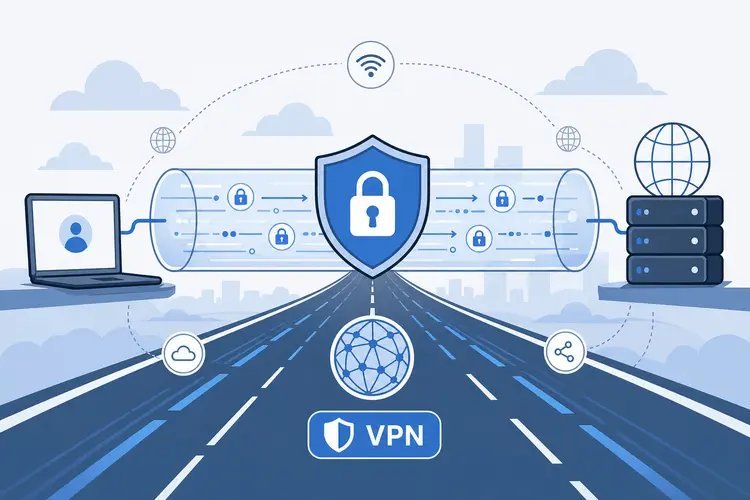
A VPN (virtual private network) encrypts your internet traffic and routes it through a server elsewhere, hiding your browsing from your internet provider and changing your apparent location. You genuinely benefit on public WiFi, when traveling, or for accessing region-locked content. At home on your own secure network, the privacy gains are smaller — your VPN provider simply replaces your ISP as the party that can see your traffic. Good paid VPNs cost $3–$6/month; skip the 'free' ones that profit from your data.
Simple enough on the surface. But once you look closer, there are a few things that can trip you up if you're not careful.
For more on this, see our guide to What internet speed do I need for streaming 4K video.
For the official word, check the FTC's guidance on VPNs and privacy, which lays out the details straight from the source.
What Is a VPN and Do I Really Need One at Home? Honest Answer
- A VPN encrypts traffic between your device and the VPN server — essential protection on coffee-shop and hotel WiFi.
- It changes your apparent location, which unblocks region-restricted streaming catalogs and services.
- Worth knowing: It does NOT make you anonymous: you're still logged into Google, Facebook, and every site that knows you.
- Free VPNs have to make money somehow — usually by logging and selling your data, which defeats the purpose.
- Reputable paid options (Mullvad, ProtonVPN, NordVPN) run $3–$6/month with independently audited no-logs policies.
What This Looks Like in Practice
I use a VPN on every hotel and airport network without exception — that part's non-negotiable. At home, I mostly use it for streaming shows that aren't available in my region. Two different jobs, one $5/month tool.
What a VPN Won't Protect You From
One thing I’ve learned after years of dealing with gadgets: the sticker price is never the whole story. There’s always a second layer — the accessories you didn’t know you needed, the subscription that seemed optional until it wasn’t, the “free” service that costs you in data. When you’re sizing up any tech decision, add about 15–20% to whatever number you’re looking at for the stuff around the edges. Cables, cases, adapters, cloud storage, the apps you’ll inevitably pay for — it adds up fast. People who budget for the extras never feel blindsided. People who don’t end up annoyed at a purchase they otherwise liked.
And here’s the part that actually matters more than specs: how long will this thing realistically serve you? A cheaper option that needs replacing in eighteen months is more expensive than the pricier one that lasts four years. I always ask myself what my future self, two years from now, will wish I’d bought. That one question has saved me from more bad tech purchases than any review site ever has.
Here’s something the spec sheets won’t tell you: real-world performance and advertised performance are different animals. Battery life is measured in lab conditions, WiFi speeds assume you’re hugging the router, and “water resistant” comes with fine print that would make a lawyer blush. I take every manufacturer claim and mentally shave off 20–30%. If the product still looks good after that haircut, it’s probably genuinely good.
User reviews are your best friend here — but read them like a detective, not a tourist. Ignore the five-star raves and the one-star rants; the truth lives in the three-star reviews where people explain exactly what bugged them after a month of real use. Sort by “most recent” too, because firmware updates can fix or break things, and a review from two years ago might describe a product that barely exists anymore.
You might also want to check out How much sleep do adults really need.
Tips From People Who’ve Done This
- Here's one that saves people real money: always use a VPN on public WiFi — that's its highest-value job.
- Here's one that saves people real money: choose a provider with an independently audited no-logs policy, not just marketing claims.
- Veterans of this stuff all say the same thing: pay with the longest plan only after a month-long trial; speeds and apps vary by provider.
- If you remember one tip from this list, make it this: enable the kill switch so traffic stops if the VPN disconnects unexpectedly.
Mistakes People Keep Making
- The classic blunder: trusting a free VPN with sensitive browsing — you're the product. I've seen this one cost people time and money more times than I can count.
- This trips up beginners all the time: believing a VPN makes you invisible online; it hides traffic from your ISP, not from the sites you log into.
- This trips up beginners all the time: leaving it off on public networks because 'I'm just checking email'.
Before You Go: Quick FAQs
How long does this usually take?
Honestly, it varies more than most guides admit. A straightforward case might take under an hour, while anything involving shipping, appointments, or waiting on parts can stretch to several days. My advice: ask for a realistic timeline up front, then add a buffer. If someone promises it'll be instant, get the details — 'instant' usually means 'the easy part is instant.'
Is the cheapest option ever the right call?
Sometimes, but rarely for things you depend on daily. The cheapest option usually cuts something — quality, support, longevity, or all three. The sweet spot is almost always the mid-range: proven, reasonably priced, with real support behind it. Buy cheap twice and you've spent more than buying right once.
How do I know I'm getting a fair price?
Get three quotes. It's the oldest advice in the book because it works. You'll quickly see the going rate, and outliers in either direction tell you something — suspiciously cheap often means corners cut, while the priciest option isn't automatically the best. Ask what each quote includes so you're comparing apples to apples.
Here’s My Honest Take
On public WiFi: yes, absolutely. At home: nice to have, not essential — unless you want location flexibility or don't trust your ISP. Either way, pay for a reputable one or don't bother.
Look, nobody wants to overthink this stuff. But twenty minutes of reading now beats an expensive mistake later.
You might also want to check out How do I transfer all my photos from an old iPhone to a new one.
One more useful resource: the FCC's consumer privacy resources — worth bookmarking before you make any final decisions.


