
Three 'car warranty' calls before noon. So how can I stop spam calls on my iPhone without missing the calls that actually matter?
So, how can I stop spam calls on my iPhone? I went down the rabbit hole on this one so you don't have to. Here's everything worth knowing, minus the fluff.
The No-Fluff Answer
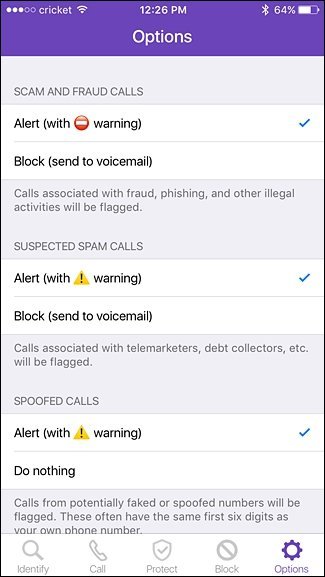
Start with Settings > Phone > Silence Unknown Callers — it sends any number not in your contacts straight to voicemail (legit callers leave messages; spammers don't). Next, enable your carrier's free spam filtering: T-Mobile Scam Shield, AT&T ActiveArmor, or Verizon Call Filter. For extra firepower, apps like RoboKiller or Nomorobo screen calls aggressively. And register at donotcall.gov — it won't stop scammers, but it cuts legitimate telemarketers.
That's the gist, but the details matter here — they decide whether you overpay, waste time, or get it right the first time.
Worth a read next: How do I transfer all my photos from an old iPhone to a new one.
For the official word, check the FCC's official robocall resources, which lays out the details straight from the source.
How Can I Stop Spam Calls on My iPhone? Every Method That Works
- Worth knowing: Silence Unknown Callers (Settings > Phone): the single most effective built-in tool — unknown numbers go to voicemail silently.
- Worth knowing: Carrier apps are free and powerful: Scam Shield, ActiveArmor, and Call Filter flag or block suspected spam automatically.
- Third-party apps (RoboKiller, Nomorobo) answer spam calls with bots that waste the scammer's time — oddly satisfying.
- Here's the thing — Register at donotcall.gov to stop legitimate telemarketers; scammers ignore it, but it thins the herd.
- Never answer, never press buttons, never call back — any response confirms your number is live.
Here’s How It Plays Out
I went from 8–10 spam calls daily to maybe one a week: Silence Unknown Callers plus my carrier's filter. The only adjustment: I had to tell my dentist's office to leave voicemails, since their number wasn't saved. Small price.
The Calls You'll Still Get (and Why)
Let’s talk about the DIY-versus-pro question, because it comes up constantly. The internet makes everything look easy — a ten-minute video, a $20 kit, and you’re supposedly set. Sometimes that’s genuinely true. But the videos never show you the three hours of troubleshooting, the stripped screw, or the part that arrives broken. My rule of thumb: if a failed DIY attempt would cost you more than the pro would have charged in the first place, just hire the pro. Your time has value, and so does your sanity.
That said, there’s real satisfaction in fixing something yourself, and plenty of tech tasks are genuinely beginner-friendly once you know which ones. The trick is matching the job to your actual skill level, not the skill level of the YouTuber who does it for a living. Start small, read the comments (that’s where the real warnings live), and have a plan B before you open anything up.
Here’s something the spec sheets won’t tell you: real-world performance and advertised performance are different animals. Battery life is measured in lab conditions, WiFi speeds assume you’re hugging the router, and “water resistant” comes with fine print that would make a lawyer blush. I take every manufacturer claim and mentally shave off 20–30%. If the product still looks good after that haircut, it’s probably genuinely good.
User reviews are your best friend here — but read them like a detective, not a tourist. Ignore the five-star raves and the one-star rants; the truth lives in the three-star reviews where people explain exactly what bugged them after a month of real use. Sort by “most recent” too, because firmware updates can fix or break things, and a review from two years ago might describe a product that barely exists anymore.
Related reading: How can I free up storage on my iPhone without deleting photos.
Smart Moves to Make
- A small thing that makes a big difference — add important numbers (doctors, schools, delivery services) to contacts so they ring through.
- It's not glamorous, but it works: check the blocked/voicemail list weekly at first to catch any legit callers.
- This one's easy to overlook: report spam calls in the Phone app's Recents — it improves filtering for everyone.
- A small thing that makes a big difference — be extra skeptical of any caller demanding payment or personal info; hang up and call back officially.
Where People Usually Go Wrong
- Here's one I see constantly: answering 'just to tell them to stop' — it marks your number as active and increases calls. Don't let it happen to you.
- This trips up beginners all the time: paying for a blocking app before trying the free built-in and carrier tools.
- Here's one I see constantly: assuming the Do Not Call registry stops scammers — criminals don't follow registries. Don't let it happen to you.
Quick Questions, Straight Answers
Is the cheapest option ever the right call?
Sometimes, but rarely for things you depend on daily. The cheapest option usually cuts something — quality, support, longevity, or all three. The sweet spot is almost always the mid-range: proven, reasonably priced, with real support behind it. Buy cheap twice and you've spent more than buying right once.
How do I know I'm getting a fair price?
Get three quotes. It's the oldest advice in the book because it works. You'll quickly see the going rate, and outliers in either direction tell you something — suspiciously cheap often means corners cut, while the priciest option isn't automatically the best. Ask what each quote includes so you're comparing apples to apples.
Can I do this myself, or should I get help?
It depends on your comfort level and what's at stake. Low-risk tasks with good tutorials are great DIY candidates. But if messing up would cost you the device, your data, or your warranty, that's the moment to call in someone experienced. There's no shame in it — pros exist for a reason, and their mistakes are their problem, not yours.
What I’d Do
Silence Unknown Callers plus your carrier's free filter eliminates the vast majority of spam. Ten minutes of setup, and your phone becomes yours again.
At the end of the day, this is one of those things where a little homework pays off fast.
If that piqued your interest, you’ll like How do I stop my phone battery from draining so fast too.
One more useful resource: the FTC's Do Not Call Registry — worth bookmarking before you make any final decisions.


